Starter
$199a month
Or $1,990 a year: 2 months free.
- 10 concurrent stagelets
- 1 environment
- Unlimited members
- No extra stagelets
Stagely runs pull request previews in your own cloud account, each behind a private URL. Your coding agent tests the change first. Then your team reviews the same running copy.
Builds from the Docker Compose files you already have. Runs in your own DigitalOcean, AWS, Google Cloud, Azure, Hetzner Cloud or Vultr account. Your cloud credentials and secret values never leave it. Stagely deletes a stagelet when its pull request closes, or, by default, 3 days after its last deploy.
List my Stagely projects. Deploy pull request 1 of acme/web. Wait until the stagelet is ready, then open it.
stagelylist_projects
"name": "acme/web"
stagelydeploy_pull_request{"repository":"acme/web","pull_request":1}
"state": "deploying"
"ready": true
The deploy started. ready is already true because the previous revision still serves. I will poll until the state is running.
stagelyget_operation{"stagelet_id":"f543a41f9949"}
"[start stderr] Container stagelet-web-1 Recreate"
The build succeeded. The start step now recreates the web container.
stagelyget_stagelet{"stagelet_id":"f543a41f9949"}
"state": "running"
"outcome": "applied"
The stagelet is running, and the new revision is applied. I will open it now.
stagelyopen_stagelet{"stagelet_id":"f543a41f9949"}
"expires_in_seconds": 30
"url": "https://f543a41f9949.stagelets.acme.dev/_stagely/handoff?token=‹redacted›"
The link works only once and expires 30 seconds after I made it.
In your cloud
acme/web is a sample repository.Stagely plans each deploy. The agent and the gateway in your cloud carry it out. Both open their connections to Stagely, so your cloud needs no inbound port from Stagely.
| Data | Where it lives | Does Stagely see it? |
|---|---|---|
| Cloud provider credentials | The agent host, and your computer while setup runs | No |
| Application secret values | The agent's encrypted store, or a file that your pipeline supplies. During a deploy, the agent also writes them to a file on the stagelet's VM that only root can read, and into the containers' environment. | No. Stagely keeps only their names. |
| Built images | Your registry | No |
| Stagelet traffic | From the gateway to the stagelet's VM | No |
| Source code | Build workers get the full source. Stagely reads .stagely.yml and the Compose files in memory while it plans a deploy. | Partly: the plan inputs, while it plans. The bundle that Stagely keeps for resets holds the resolved Compose model and the contents of env_file files. |
| Plain config values | Stagely's config snapshots and compiled deploy bundles | Yes |
Stagely checks your Compose files when it plans a deploy. The agent checks the resolved project again, with every variable filled in, before it builds. It refuses:
network_mode and pidsecurity_opt except no-new-privilegesnetwork: host and sshNamed volumes are fine. They survive deploys and resets of the same stagelet.
An agent connects to Stagely over MCP. It deploys the pull request it just opened, reads why a deploy failed, and opens the running app to test its change. A person then reviews the same stagelet.
Add the server, then sign in.
claude mcp add --transport http \
  stagely https://app.stagely.dev/mcp
claude mcp login stagely
Your browser opens the consent page. Choose the account and click Allow. Other MCP clients connect the same way: Stagely's endpoint uses Streamable HTTP and OAuth with PKCE.
deploy_pull_requestget_stageletget_operationopen_stageletreset_stageletdelete_stageletlist_projectslist_stageletsWhen the project deploys on push, the default, a new pull request or a push to one starts a deploy. New commits on a pull request from a fork never deploy it. A comment on the pull request, a click in the console, an MCP call or a deploy label, if the project sets one, can also start a deploy.
.stagely.yml names your Compose files, the service people open, its health check and an optional migration command.
For each deploy, Stagely reads this file and the Compose files at the pull request's head commit through the GitHub API. It does not clone your repository. Plain config values fill in variables such as GREETING. Secret values reach containers only as environment variables, straight from the agent.
version: 1
compose:
  - compose.yml
public:
  service: web
  port: 8080
health:
  path: /healthz
migration:
command: /app/migrateservices:
web:
build: ./web
environment:
GREETING: ${GREETING:-hello}
PROBE_URL: ${PROBE_URL:-}
env_file:
- web.env
depends_on:
- cache
cache:
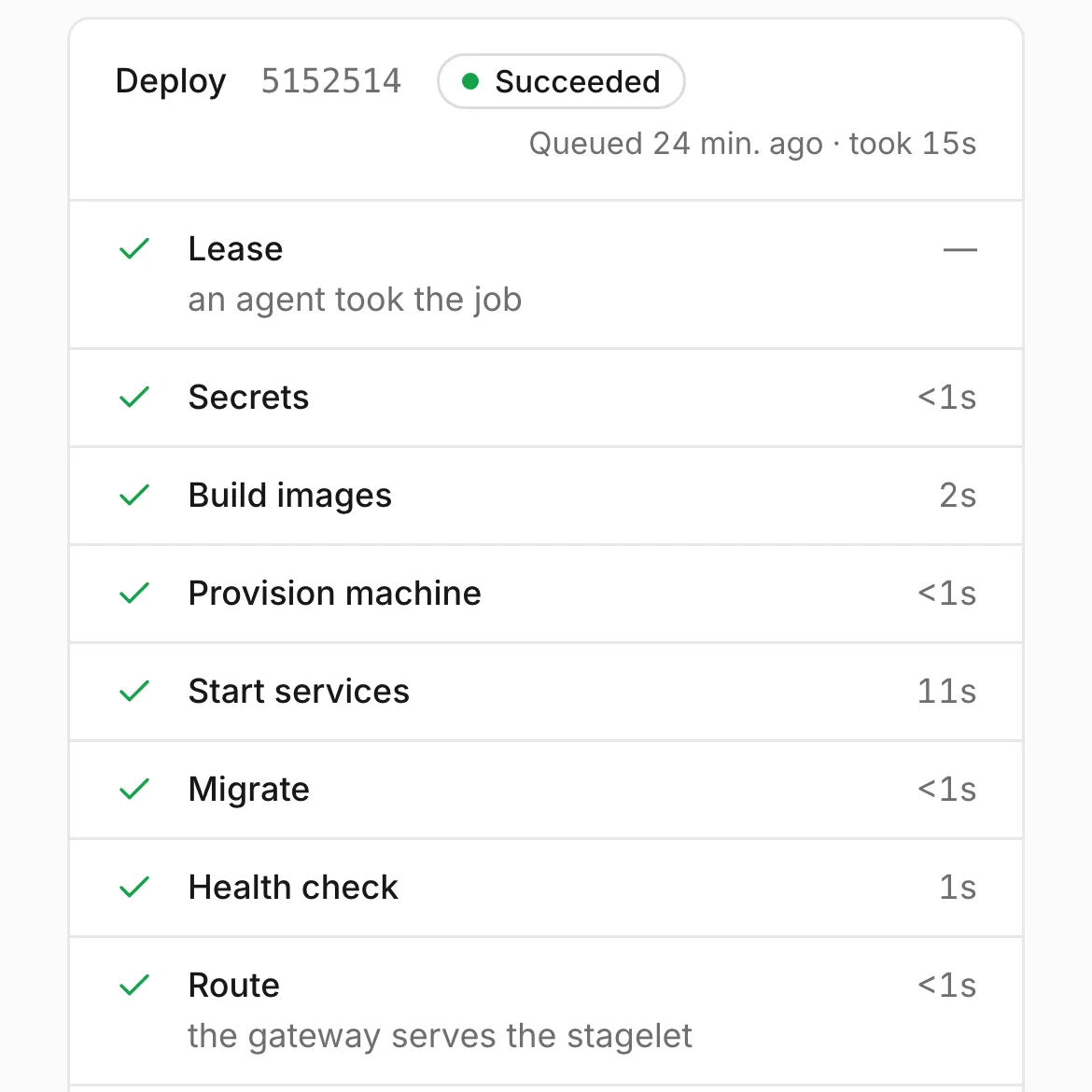
image: redis:7-alpineThe agent in your cloud takes the job and fills in secret values from its own store. A build worker builds the images and pushes them to your registry. Meanwhile, the agent prepares the stagelet's own VM. Then it starts the services with each image pinned by digest, runs your migration and checks the health path. Last, the gateway routes the private URL.
The console and MCP show each step live, with its log. Each state has its own card: revision, app health, machine, gateway, reachability and expiry. So a failed deploy never hides a stagelet that still serves.
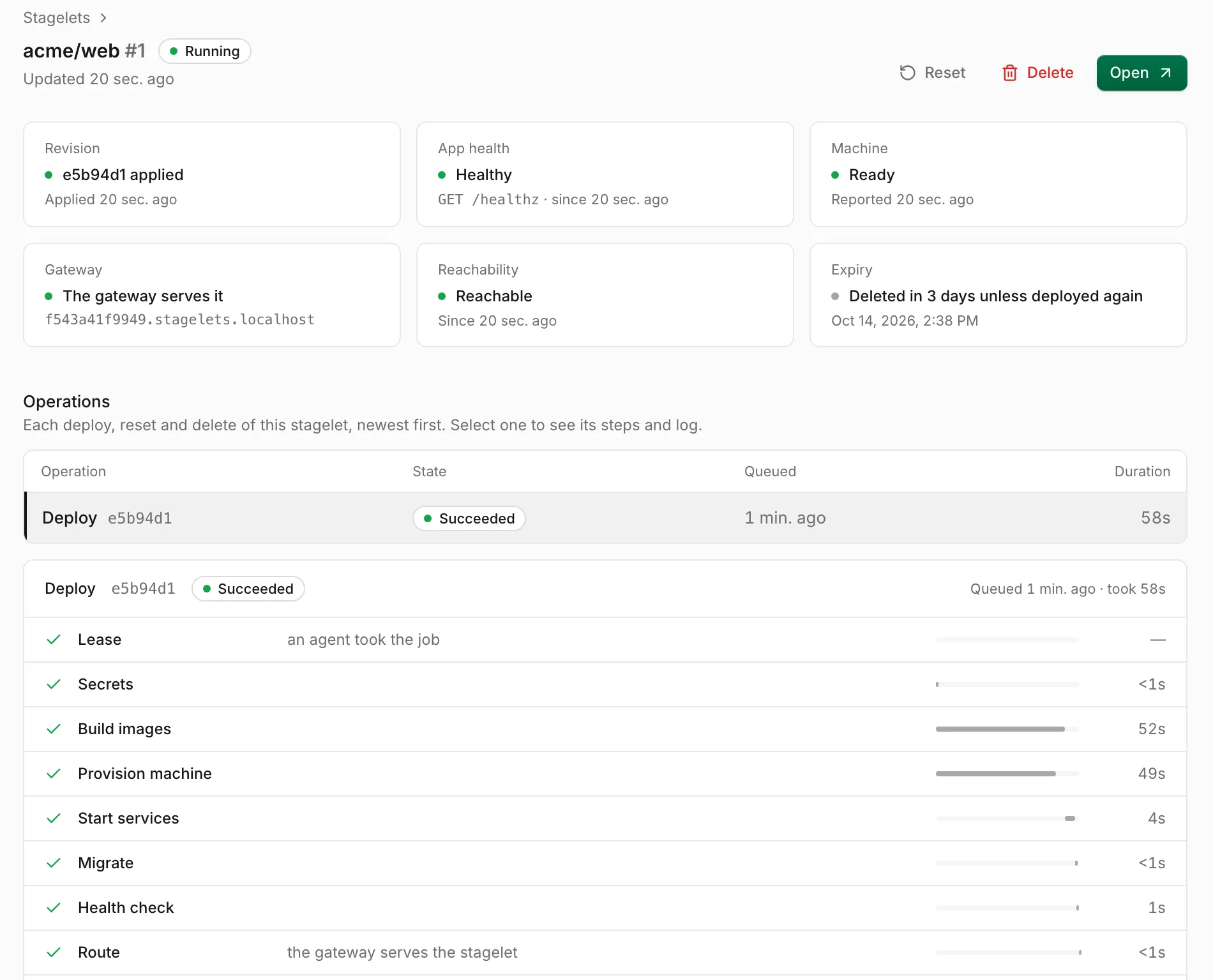
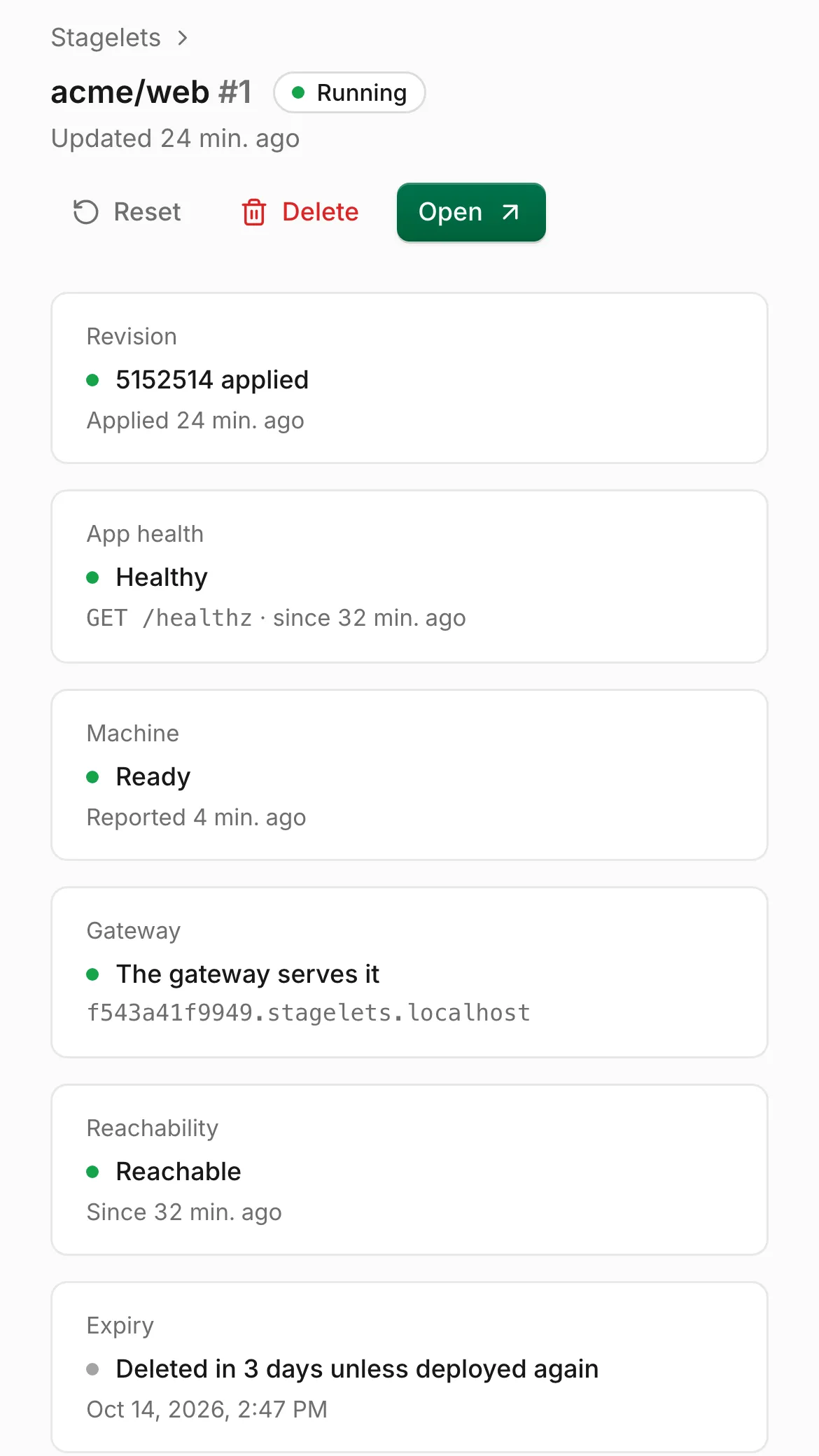
A reviewer clicks Open on the stagelet in the console. The console gives them a pass into the private URL. The pass works once, for 30 seconds. The session it starts belongs to that reviewer. Without a pass, the gateway turns everyone away.
$ curl -s -i https://f543a41f9949.stagelets.acme.dev/
HTTP/2 401
content-type: text/plain; charset=utf-8
x-content-type-options: nosniff
content-length: 35
date: Sun, 11 Oct 2026 12:13:27 GMT

open this stagelet through StagelySetup takes six steps: an account, the GitHub App, two commands, a DNS record, a file in your repository and your config. After that, each pull request needs nothing from you.
Sign up with GitHub, start a 14-day trial in Stripe Checkout and invite your team.
Install the Stagely GitHub App where your repositories live, and link it to your Stagely account.
stagely setupSign in with stagely login, then run stagely setup <cloud>. Point -binaries at a directory with Linux builds of stagely-agent and stagely-gateway. Setup applies a Terraform module with OpenTofu or Terraform. It creates a network, the agent host, the gateway host and their firewall rules in your cloud account. On DigitalOcean, Google Cloud, Azure and Vultr, it also creates a container registry. AWS uses Amazon ECR in your account. On Hetzner Cloud, you bring your own registry. Then setup installs the agent and the gateway and enrolls them with Stagely. Run it again at any time to repair or upgrade.
Setup prints the gateway's address. Point *.stagelets.example.com at it with an A record. On DigitalOcean, setup can add the record for you.
.stagely.ymlCommit it to the repository, then bind the repository to a project in the console.
Add plain values in Stagely. Store secret values on the agent. Stagely keeps only their names.
Applying the bootstrap module in ~/.stagely/local/setup/terraform
…
Plan: 4 to add, 0 to change, 0 to destroy.
…
Apply complete! Resources: 4 added, 0 changed, 0 destroyed.
…
Started dev.stagely.local.agent; its log is ~/.stagely/local/setup/agent.log
Creating Lima VM stagely-local-gateway for the gateway
Installing stagely-gateway in Lima VM stagely-local-gateway

Environment local (0d2b8bc75509d5a6) runs on this Mac. Stagelets open at https://<id>.stagelets.localhost:9444.
Output of stagely setup lima, shortened. This command sets up a local test environment on a Mac.
The setup command for each cloud
stagely setup digitaloceanstagely setup awsstagely setup gcpstagely setup azurestagely setup hetznerstagely setup vultrstagelets.example.com.One flat price for each plan, with unlimited members. Your own cloud bill covers what runs in your cloud. The first 14 days are free, and you need no card to start.
$199a month
Or $1,990 a year: 2 months free.
$499a month
Or $4,990 a year: 2 months free.
$1,499a month
Or $14,990 a year: 2 months free.
A stagelet counts until Stagely deletes it, in any state. At the limit, Stagely refuses a deploy that needs a new stagelet and says why. Deploys of stagelets that exist always work.
The agent host and the gateway host run all the time. Stagely deletes a stagelet when its pull request closes or its project's TTL ends, so its VM does not keep running.
Yes. Other tools call a running copy of one pull request a preview environment. A stagelet has its own VM and a private URL. In Stagely, an environment is something else: the part of your cloud account that stagely setup prepares, with one agent and one gateway. One environment runs many stagelets.
Partly. To plan each deploy, Stagely reads .stagely.yml, your Compose files and the files they reference through the GitHub API, in memory. It keeps a compiled bundle for resets. The bundle holds the resolved Compose model and the contents of env_file files. The full source goes only to the build workers in your cloud.
Apps that run with Docker Compose, within the Compose rules above. Stagely follows include, extends and env_file. It refuses settings that give a container access to its machine, such as privileged mode, host namespaces, bind mounts and the Docker socket.
Only on purpose. Someone with write access comments the deploy command, clicks Deploy in the console, or adds a deploy label, if the project sets one. New commits on a fork's pull request never deploy it on their own.
The stagelet shows the failed step, its error and its log, in the console and over MCP. Stagely tracks the revision, the machine and the app's health separately, so you can see whether the previous revision still serves. Reset restores the last good build.
Your stagelets keep running in your cloud, but the gateway fails closed. It refuses every session it can't confirm again within about 50 seconds, and closes open connections within about a minute.
It works only with GitHub. It does not run unrestricted or privileged Compose, and it does not deploy to Kubernetes. Stagely does not host your apps: stagelets always run in your cloud.